System Data Values
Contents
1 - Time: The time and date the data packets showing on the portal were collected.
2 - Status: The status of the inverter currently it can be either; normal, alert, waiting and lost.
2.1 - Normal: The inverter is running correctly and as planned.
2.2 - Waiting: The inverter is currently not charging or discharging.
2.3 - Warning/error: The system has a found a fault within the inverter.
2.4 - Lost: The inverter has lost its WiFi signal to upload the data packets.
3 - PV System data.
3.1 - VPV1/2: The voltage going into the inverter via wind or solar generation 1st/2nd strings.
3.2 - IPV1/2: The current going into the inverter via wind or solar generation 1st/2nd strings.
3.3 - PPV1/2 & PPV: The power generated via wind or solar generation shown in watts. The PPV1/2 values show the amount of power generated via wind/solar for each string, the PPV value is showing the overall power generated via both strings going into the customers unit.
4 - Data from the grid.
4.1 - VAC: Voltage on the grid.
4.2 - IAC: Current on the grid.
4.3 - PAC: Power on the grid, this value is taken directly from the EM115 grid meter.
4.4 - FAC: Frequency on the grid.
5 - Inverter system data
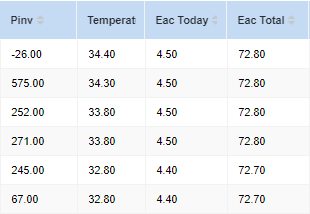
5.1 - Pinv: The power the inverter is issuing out in watts.
5.2 - Temperature: The temperature inside the inverter currently.
5.3 - EAC Today: Energy output from the inverter via solar/Battery in that given day.
5.4 - EAC Total: Energy output from the inverter via solar/battery in total.
5.5 - Run time: The runtime of the inverter measured in hours.
5.6 - CHG_Temperature: The temperature of the backboard inside of the inverter unit.
6 - battery system data
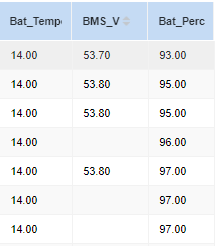
6.1 - Bat_V: The voltage of the battery measured in volts.
6.2 - Bat_I: The current in the battery shown by volts
6.3 - Bat_Power: Power shown in the battery shown in watts.
6.4 - Bat_Percentage: The charge within your battery shown in percentages.
6.5 - Bat_Temperature: The core temperature within the battery.
6.6 - Bat_percentage: The SOC (state of charge) The current charge parcentage of your battery.
Related Articles
System Commissioning
System commissioning is a critical phase that ensures the All-in-One system and its associated components are correctly configured and verified for safe and optimal operation before going live. This process must be performed by a qualified technician ...Accessing Monitoring Data on the Portal
Step 1: Log into the GivEnergy Monitoring Portal at www.givenergy.cloud Step 2: After logging in, you’ll be taken to the Monitoring Portal Dashboard. From here, you can view information about your systems import/export data, solar forecasts, tariff ...How to Wire the GivEnergy LoRa Data Cable
Overview This guide explains how to correctly wire the GivEnergy LoRa Data connection between the inverter and the meter for Gen3 systems. Correct wiring ensures stable data communication and prevents signal loss between devices. Wiring Instructions ...Monitoring Portal System Mode Settings
1. Access your Monitoring Portal Dashboard via www.givenergy.cloud and sign in using your username and password. 2. On your Monitoring Portal Dashboard, click on the My Inverter card. 3. Navigate to the System Mode Settings menu. 4. Here, you will ...System Overview
A - 2 hexagon socket screws, M6x14 B - Wiring chamber C - Wire sealing ring D - Fixed wire E - 8 internal hexagonal screws, M5x18 F - 2 Phillips screws, M4x8 G - Inverter serial and WIFI serial number H - Warning signs label I - Specification label J ...